
Nissan Leaf 2025 Owners Manual
6.5.1. How to use the vehicle information display
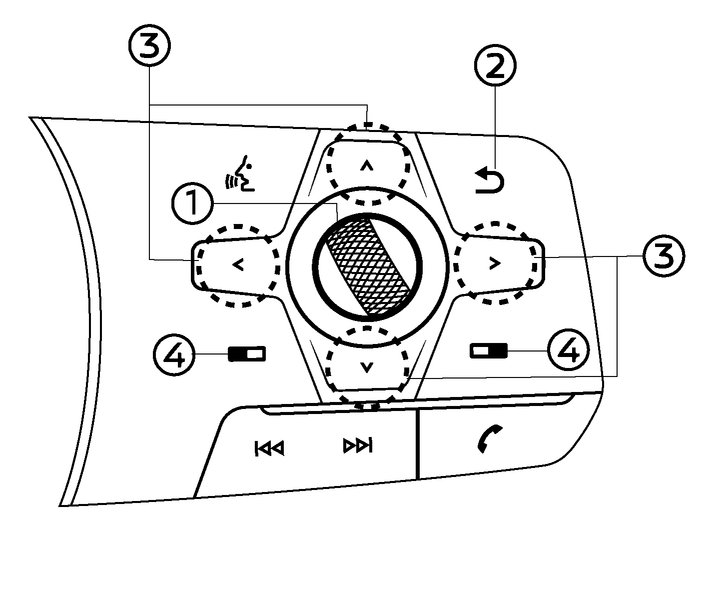
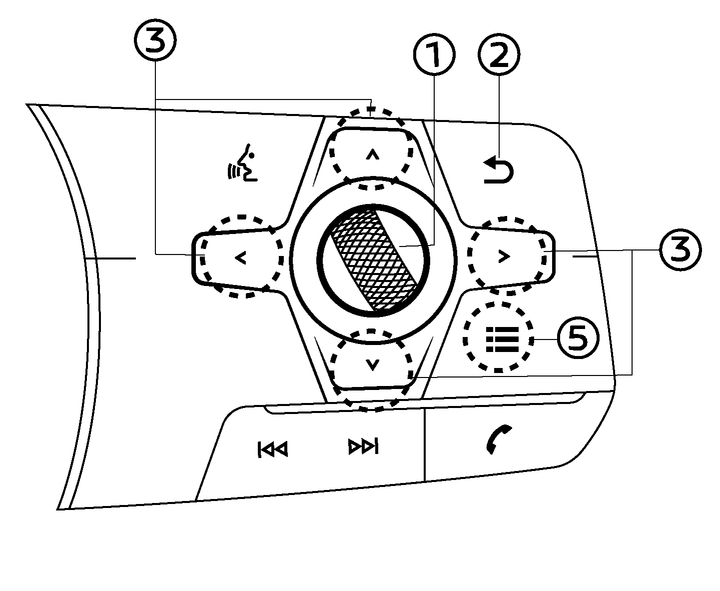
The vehicle information display can be changed using the dial and buttons located on the steering wheel.
Scroll dial - navigate through the items and change or select an item in vehicle information display this scroll dial allows up/down navigation and push to select
 - go back to the previous menu


 - change from one display screen to the next (i.e. trip, energy economy)
Type A (where fitted):
For LHD models, push
. to operate the touch screen display by the steering-wheel-mounted controls. For additional information, see
 For LHD models, push
 to operate the vehicle information display by the steering-wheel-mounted controls. If the vehicle information display is already active ( illuminates in yellow), pushing this switch will cause [Shortcut Menu] screen to appear.
For RHD models, push
to operate the vehicle information display. In case that the vehicle information display was already active ( illuminates in yellow), pushing this switch will cause [Shortcut Menu] screen to appear.For RHD models, push
to operate the touch screen display.Type B (where fitted):
Pushing
 displays the [Shortcut Menu] screen.